Search This Blog

Showing posts with label Lap. Show all posts

Tuesday, 20 August 2013

How To Trace Your Stolen Laptop/PC Using MAC ID

Hello..Friends.. Before I'm Posted Reliance Free GPRS Trick Working Fine..
Today Im Posting New Trick To Trace Your Stolen Laptop Or PC..

We Know That, A Stolen Mobile Can Find Using IMEI (International Mobile Equipment Identity)
Number.. But We Never Heard Any Trick To Trace A Stolen Laptop..
Yess.. Its Possible To Trace A Stolen Laptop-PC..
Today Im Providing This New Trick To Get Back Your Laptop..

JUST FOLLOW BELOW STEPS:

Step:-1) Whenever a Laptop is Connected To Internet At That Time We Can Trace This Laptop-PC Using MAC-ID (Media Access Control ID), So Its Important To Know You MAC-ID Of Your Laptop-PC
Step:-2) There Are Many Softwares Available On Internet To Trace Your LaptopUsing MAC-ID,
So Download Any Software For That..
Step:-3) To Know What is MAC-ID And From Where It is Find, Just Click Here To Know About It..

Tricks to shutdown computer automatically on your scheduled time


     We always post tricks related to PC And Laptops
Today again posting very useful trick to all PC Users..
Many time we forget to shutdown our computer due to sleep or anything else..
When we awake then we see that our computer still the same.
Interesting thing is that many of us has habit to sleep down while working on computer without shut down.
But there is solution for these type of lazy peoples to shut down computer automatically.
Yes, you can shutdown your computer automatically on your scheduled time.
How?? Lets See,
 

HOW?

Download WinMend Freeware Software (WinMend Is Utility Which Turns Off Your Computer Automatically. With Simple , It Can Shut Down, Hibernate, Stand by or Log off The Computer Unattended At a Scheduled Time. Supports Language: English, Hungarian, Vietnames and Russian.)
Main Features:
  • Countdown Screen-
There is a 30-second countdown screen before the computer is automatically turned off, so you can cancel or change the operation in time.
  • Compact-
When auto shutdown is set up, it will be minimized to the task bar. Your screen will look clean!
  • Intelligent-
Based on user’s settings, it can be launched automatically at Windows startup to perform tasks set by the user.
  • Freeware Software, easy to download and customize.

How to hide a files and folder using in command prompt


Everyone has some secret data on their computer or laptop and hide with using traditional hide method.
Now everyone knows the traditional hide method and your secret files becomes public files.
But now you can hide your secret files without any software completely safe. No one can find your secret files now. The trick which we posting today is based upon the 'CommandPrompt'.
Once you hide any files then no one can find it.

Benefits:-

  1. Once you hide files/folders using this method then these files can not viewed by any search option.
  2. If you click 'Show Hidden Files And Folders' then also it cant shown by any search option.

JUST FOLLOW BELOW SIMPLE STEPS TO HIDE FILES:

Step:-1) Press Windows Key + R Then Run Command Box Will Appear. 
Step:-2) Now Type 'cmd' And Hit Enter. 
Step:-3) Then Command Prompt Window Will Display.
Suppose We Have To Hide Folder 'xyz' And Its Path Is, "D:\xyz"
Step:-4) Then Type, "attrib+s +h D:\xyz" And Hit Enter. (D:\xyz is a demo folder name) . 
Step:-5) Now Your Folder Successfully Hide.


Saturday, 25 May 2013

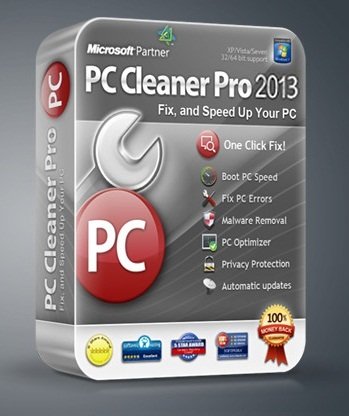
PC Cleaner Pro 2013 11.0.13.5.25 With Patch | Full Version 5MB


We believe computers are meant to speed things up, not slow things down, so you can work smarter and faster. That's why we engineered PC Cleaner to provide outstanding antivirus and antispyware protection, and PC optimization tools that works quietly and efficiently, without slowing your PC down like other bloated security products.

• Registry Cleaner
PC Cleaner will remove unused and old entries, including File Extensions, ActiveX Controls, ClassIDs, ProgIDs, Uninstallers, Shared DLLs, Fonts, Help Files, Application Paths, Icons, Invalid Shortcuts and more.

• Increase Your PC’s Performance
PC optimization is the quickest way to adjust your system settings at once. PC Cleaner will analyze your system & adjust your PC to function at its maximum potential performance.

• Boost Your PC’s Speed
PC Cleaner will tweak your complete system to help boost your PC speed and overall system performance. You could have faster downloads, uploads, web surfing and more.

• Certified Virus + Spyware Protection
Certified Antivirus Pro will scan your complete system for malicious threats including: viruses, spyware,. rogue programs, trojans, adware, rootkit, dialers, worms, parasites and other potentially harmful programs that may be installed on your computer.

• Security Defense
PC Cleaner will scan and check for windows vulnerablities within Windows system. Windows Update is a service provided by Microsoft. Security updates or critical updates protect against vulnerabilities to malware and security exploits.

• Clean Your System
In using a computer from day to day you're going to accumulate system clutter. You can significantly increase your PC performance & stability by removing these files.

• Privacy Protection
PC Cleaner is designed to protect you by cleaning up all the unwanted history data on your computer which could also put you at risk of identity theft.

• Internet Optimizer
PC Cleaner will automatically adjust your internet connections to increase super fast web surfing, faster downloads including: music , movies games and video downloads.

• System Optimizer
PC System Optimizer is the fastest way to adjust all your system settings at once. The PC Optimizer works by determining what type of PC you have and what programs you have installed. Then it will adjust system settings so that your machine will function at its maximum capacity.

• Memory Optimizer
PC Cleaner will optimize your memory and recover wasted memory (RAM), space and improve system performance.

• Startup Manager
Startup Manger allows you control of what programs are launched when you start your computer. You can disable unnecessary programs that are slowing you down.

• Uninstall Manager
This feature lets you easily uninstall applications that you don't want you your computer.

• BHO Manager
Stabilize your browser and speed up web efficiency by managing Browser Helper Objects and Plugins.

• ActiveX Manager
Many ActiveX controls are actually beneficial, but malicious programs frequently use ActiveX controls in order to embed themselves on your system through browser security exploits or compromised security settings. PC Cleaner's definition database contains a comprehensive list of malicious ActiveX objects, which will be automatically loaded to the blocked list. This file is updated continuously by our definitions team.

• Duplicate File Remover
PC Cleaner Duplicate File Remover will easily find and remove duplicates and help you reclaim valuable disk space and improve data efficiency. Duplicate files are in most cases redundant and unnecessary, so keeping them is merely a waste of hard disk space.

                                                   DOWNLOAD NOW

Monday, 22 April 2013

how to download and install the drivers for Dell printer

When installing Dell Printer drivers in Windows 7 there is a recommend procedure. This procedure will ensure the most successful installation possible. Please refer to Dell Knowledge base article Windows 7 Printer Driver Installation Recommended Procedure for more information.
  1. Browse to the Drivers and Downloads page.
    (When the Drivers and Downloads page opens to the correct model of Printer proceed to Step 3, when another product shows click Change Your Product.


  2. Under the Yes subheading enter your Service Tag to get a concise list of drivers for your specific product model.
    Note:


  3. Select the desired Operating System from the drop-down menu as pictured in Figure 1.

    Operating System:    

      Windows 7 64-bit


  4. Click Printers.


  5. Click the Run button.


  6. Make sure the box next to Close this dialog box when download completes is unchecked.


  7. When the download completes, click Allow or Run.


  8. On the Printers: window, click Continue.


  9. In the Select the folder where you want to unzip the files to window, click OK.


  10. If a message appears asking to overwrite the folder, click Yes to All. If a message appears asking to create a folder, click Yes.


  11. In the All files were successfully unzipped window, click OK.


  12. Follow the prompts that appear to install the driver.


  13. If prompted to restart your computer, click OK.

Thursday, 7 February 2013

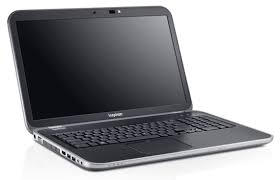
New Dell Inspiron and Special Edition Laptops


Dell in couple of days announced its expanded just in time for graduation gifts and the upcoming back to school shopping season. Parents always want their kids to have the best advantages, and Dell is capitalizing on that by offering an impressive line-up of Inspiron laptops tailored for the unique needs of families and students. The new Inspiron 13z and 14z notebooks offer thin and light design for people on the go. The Inspiron 15R and 17R are stylish, budget-friendly laptops for everyday family PC activities, while the Inspiron 15R Special Edition and 17R Special Edition offer studio-quality multimedia and audio -- available soon on.
          The team from Notebook Review spent some hands-on time with the latest members of the Inspiron family and we were impressed. All of the new Inspirons feature exciting new designs with curved edges rimmed by what Dell calls a "Moon Silver band" (we call it aluminum or silver-colored plastic depending on the laptop) for a smooth, contemporary look. The latest Inspiron laptops feature Waves MaxxAudio technology to deliver "studio-quality sound" for watching movies and listening to music without the need for external speakers. The Inspiron 13z and 14z and the Inspiron R Special Edition series also feature Skullcandy-branded speakers integrated into the laptops.
        If cool designs and quality audio aren't your thing, you'll be happy to know all of the new Inspirons are equipped with the latest technology such as Intel's new third Generation Core i processors (Ivy Bridge), Home Premium, and will be eligible for the Microsoft Windows 8 upgrade program. 
        Dell's first Inspiron Ultrabook, the Inspiron 14z, will likely be a strong seller this year thanks to the combination of stylish looks, solid features, and a modest price tag that starts at just $699.99 on June 19. The Inspiron 14z is Dell's second Ultrabook offering after the impressive . The Inspiron 14z combines Intel Rapid Start Technology for fast boot and resume and up to seven hours of battery life. With a premium brushed aluminum finish in two color choices, Moon Silver and, coming later this summer, Fire Red, the Inspiron 14z is a well-built and well-equipped Ultrabook. Starting at 4.12 pounds (1.87kg), and 0.83-inches (21mm) at its thickest point, it's light and easy to carry in a backpack or messenger bag.
        Rounding out the Inspiron z series portfolio is the Inspiron 13z. This "ultraportable" isn't technically an "Ultrabook" since it doesn't comply with all of Intel's strict guidelines for Ultrabook design, but the Inspiron 13z is no less impressive and starts at an even lower price of $599.99. With a range of available color SWITCH lids for customizing - Moon Silver (standard), Fire Red and Lotus Pink - up to seven and a half hours of battery life, and starting at a mere 3.81 pounds (1.73kg), and 0.82-inches (20.7mm), students and style-conscious adults will probably gravitate to this laptop.
      Both of the Inspiron z series laptops offer mobile broadband as an option with Dellmobile broadband service. Dell NetReady provides connectivity on a session-based model and is a "pay-as-you-go" service that allows connection in places where Wi-Fi may not be available.
   The new Inspiron R Special Edition laptops feature an anodized aluminum exterior in Stealth Black, Full HD display (1920x1080) for stunning video playback and Blu-ray disc options. The Inspiron 17R Special Edition is also available with a super bright 400 nit Full HD display or an optional Full HD 3D display. With backlit keyboards, and optional mSATA  devices with Intel Rapid Start Technology for fast boot and sleep resume times, the Inspiron R Special Edition laptops are packed with technology and features to make multimedia fun in any environment.